Ipphones

  • Subscribe to our RSS feed.
  • Twitter
  • StumbleUpon
  • Reddit
  • Facebook
  • Digg

Tuesday, 5 May 2009

Procedural Spheres in OpenGL ES

Posted on 16:21 by Unknown
OpenGL ES does not have GLU, which is a utility library available in regular OpenGL. Among the many things that GLU provides is a bunch of methods for rendering primitive shapes like cylinders and spheres, which can be really handy. The math behind calculating these shapes procedurally can be a little mind-bending, especially if you're new to the whole 3D thing.

I'm currently working on Part 5 of the OpenGL ES from the Ground Up series, which is on materials. I wasn't happy with using the icosahedron that I'd been using for the first four installments of the series. The interplay between lights and materials on the icosahedron just doesn't show the specular component in a way that's obvious enough. The ideal shape for showing a specular hightlight is, of course, a sphere.

So, I set out to render a sphere in OpenGL ES, which turned out to be nowhere near as straightforward as I thought it might be. Right now, the code is a little rough around the edges, but it works, and allows you to specify a "resolution" in terms of the number of "slices" and "stacks" that make up the sphere. These basically just define how many vertices there are latitudinally and longitudinally. Think of an orange. If you slice it with a knife vertically, those are "slices". If we cut it horizontally, those are "stacks". Well, not exactly, unless your knife curves at just the right angle, but it's good enough analogy.

As you can see from this illustration, the more slices and stacks you have, the smoother your sphere looks. But, the more slices and stacks you have, the more processing power your sphere uses. The number of vertices increases exponentially as you increase the stack/slice count.
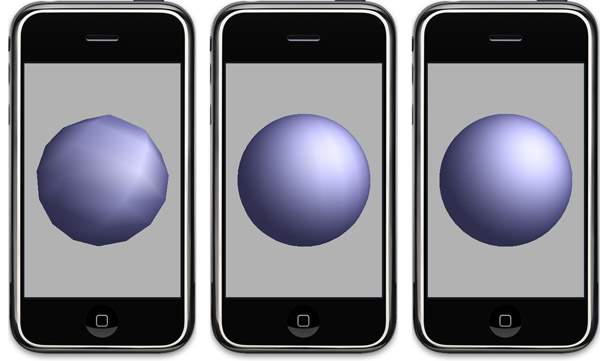
threespheres.jpg

Three spheres created with this code, one with 8 slices and stacks (left), one with 25 slices and stacks (middle) and one with 50 slices and stacks (right).


Right now, this code comes in the shape of a rather scary-looking (but well-commented and quite attractive looking) C-function that takes four handles, two pointers, two unsigned integers, and a float.

                                                            // =========================================================
void getSolidSphere(Vertex3D **triangleStripVertexHandle, // Will hold vertices to be drawn as a triangle strip.
// Calling code responsible for freeing if not NULL
Vector3D **triangleStripNormalHandle, // Will hold normals for vertices to be drawn as triangle
// strip. Calling code is responsible for freeing if
// not NULL
GLuint *triangleStripVertexCount, // On return, will hold the number of vertices contained in
// triangleStripVertices
// =========================================================
Vertex3D **triangleFanVertexHandle, // Will hold vertices to be drawn as a triangle fan. Calling
// code responsible for freeing if not NULL
Vector3D **triangleFanNormalHandle, // Will hold normals for vertices to be drawn as triangle
// strip. Calling code is responsible for freeing if
// not NULL
GLuint *triangleFanVertexCount, // On return, will hold the number of vertices contained in
// the triangleFanVertices
// =========================================================
GLfloat radius, // The radius of the circle to be drawn
GLuint slices, // The number of slices, determines vertical "resolution"
GLuint stacks // the number of stacks, determines horizontal "resolution"
// =========================================================
)


My plan is to wrap this all up in a nice Objective-C class at some point in the not-too-distance future so that it will be easier to use, but I probably won't get to that right away. So, since I figure there must be some other people out there who need spheres or are curious how they might be done, I'm posting a sample project with my rough sphere code that you can look at to see how it works.
Note: I've been advised by somebody much smarter on OpenGL than I am that per-vertex specular highlights "look like total ass" unless you have a super-dense mesh, which you can see in the left-most screenshot above. In general, this code is probably not well-suited for use in a game or application where real-time performance is crucial if you're using strong specular lighting. But it will work quite nicely for showing the effects of lighting and material settings in OpenGL ES, especially when run in the simulator where we have processing power to spare
The sphere is built out of a triangle strip and a triangle fan, so one handle you pass in gets populated by the method with the vertex data for the triangle strip, another with the vertex data for the triangle fan.

Since these two sets of vertices have to be submitted to OpenGL separately, it made sense not to combine them into one array. In order to work with lights and smooth shading, the function also calculates the normals for both of these arrays - which accounts for the other two handles.

The two pointers are to variables that, on return, will identify the number of vertices in the triangle strip vertex array and the triangle fan vertex array.

Finally, there's a GLfloat that's used to specify the size of the sphere, and two GLuints to specify the number of stacks and slices. You'll probably almost always want to use the same number of stacks and slices, but I kept them separate just in case.

To use this function, you need to declare some variables. In the sample projects, they are instance variables of the view controller:

    Vertex3D    *sphereTriangleStripVertices;
Vector3D *sphereTriangleStripNormals;
GLuint sphereTriangleStripVertexCount;

Vertex3D *sphereTriangleFanVertices;
Vector3D *sphereTriangleFanNormals;
GLuint sphereTriangleFanVertexCount;


These values get passed in like so:

    getSolidSphere(&sphereTriangleStripVertices, 
&sphereTriangleStripNormals,
&sphereTriangleStripVertexCount,
&sphereTriangleFanVertices,
&sphereTriangleFanNormals,
&sphereTriangleFanVertexCount,
1.0,
50,
50)
;


You do not have to allocate memory for the vertices or normals. BUT you do have to free the memory when you're done, like so:

    if(sphereTriangleStripVertices)
free(sphereTriangleStripVertices);
if (sphereTriangleStripNormals)
free(sphereTriangleStripNormals);

if (sphereTriangleFanVertices)
free(sphereTriangleFanVertices);
if (sphereTriangleFanNormals)
free(sphereTriangleFanNormals);

Finally, here's how you draw the sphere using the values returned from getSolidSphere():

    glEnableClientState(GL_VERTEX_ARRAY);
glEnableClientState(GL_NORMAL_ARRAY);

glVertexPointer(3, GL_FLOAT, 0, sphereTriangleFanVertices);
glNormalPointer(GL_FLOAT, 0, sphereTriangleFanNormals);
glDrawArrays(GL_TRIANGLE_FAN, 0, sphereTriangleFanVertexCount);

glVertexPointer(3, GL_FLOAT, 0, sphereTriangleStripVertices);
glNormalPointer(GL_FLOAT, 0, sphereTriangleStripNormals);
glDrawArrays(GL_TRIANGLE_STRIP, 0, sphereTriangleStripVertexCount);

glDisableClientState(GL_VERTEX_ARRAY);
glDisableClientState(GL_NORMAL_ARRAY);

That's all there is to it. I'll be using this code in the next OpenGL blog posting so we can talk about lighting and materials, though I probably won't get to that until after the weekend. I'm going away for a long weekend and my wife's not letting me bring my computer.

Let me warn again that this code is probably not a good solution for anything that needs to run fast in realtime on the phone with strong specular lighting. I'll probably add the ability to populate a texture coordinate array to this function at some point, which will make it more suitable to realtime programs. As always, use at your own risk, there are no warranties, yada yada. You know the drill.
Email ThisBlogThis!Share to XShare to Facebook
Posted in | No comments
Newer Post Older Post Home

0 comments:

Post a Comment

Subscribe to: Post Comments (Atom)

Popular Posts

  • Making OpenGL ES Screenshot
    The Bit-101 Blog has an entry that shows how to take a screenshot when using OpenGL ES . I tested this in my much-delayed particle-generato...
  • Adding CLANG to Your Build Process
    Frasier Spiers has a nifty piece this morning on using Git pre-commit hooks to automatically run the CLANG Static Analyzer. I'm not a G...
  • CLANG Static Analyzer
    If you aren't using the LLVM/Clang Static Analyzer , you really should be. The Clang Project is an attempt to write a front end for the...
  • A Little Help
    I'm having a problem with OpenGL ES, and it's keeping me from finishing my particle engine post. I was hoping someone here could see...
  • WWDC Accommodations
    Staying downtown in San Francisco is very expensive in the summertime. Bu, if you're going to WWDC, you really want to stay downtown. Yo...
  • Xcode File Templates and a Mystery
    One of the things that confuses many newcomers to Xcode is how to set it up so that your company name gets automatically filled in when you ...
  • Brain Surgery?
    Craig Hockenberry has an interesting post on his blog today about the iPhone background processing issue. Craig speaks from personal experi...
  • Book's Almost Done
    I just finished Chapter 16. I'll give it another read-over in the morning then it will go off to my writing partner for his review, then...
  • iPhone Alley
    Looks like Dave and I are going to make an appearance on the iPhone Alley Podcast next week. We're recording on Sunday night, so I woul...
  • Shuffling Arrays
    Ever want to randomize an array of items? It's a task that, for some reason, I've had to do a lot in recent programs. So, I wrote a ...

Categories

  • 3D Models
  • Ad Hoc Distribution
  • ADC
  • Address Book
  • Amazon
  • Anaglyphs
  • App Store
  • Apple
  • Apple DTS
  • Apple Store
  • Application Store
  • articles
  • Award
  • Background Processing
  • Barcodes
  • Beta
  • Blog
  • Blogger
  • Blogging
  • Blogs
  • Blogspot
  • Book project
  • Bug Reporting
  • Captain Obvious
  • Categories
  • Censorship
  • CFFoundation
  • CGAffineTransform
  • Clang Static Analyzer
  • Cocoa
  • Cocoa Touch
  • Code Reuse
  • Code Signing
  • Computer
  • conferences
  • Controller Classes
  • Core Animation
  • Daring Fireball
  • Database
  • Debugging
  • Defect
  • Delegates
  • Design Awards
  • Developer Certifications
  • Discussion Forums
  • Edit Mode
  • employment opportunities
  • Encryption
  • Enterprise
  • Errata
  • free code
  • Free software
  • Full Screen
  • Game Programming
  • Gestures
  • Getting Started
  • goof
  • Google Code
  • Google Maps
  • Gotcha
  • Help
  • HIG
  • HTTP PUT
  • Idiots
  • Idle Timer
  • Images
  • Instruments
  • Interface Builder
  • iPHone
  • iPhone Applications
  • iPhone Dev Center
  • iPhone Developers
  • iPhone OS 3.0
  • iPhone SDK
  • iPhone SDK PNG
  • iPhone Simulator
  • iPhoneSDK
  • iPod
  • Job Opportunities.
  • k
  • Key Value Observing
  • Keynote
  • KVO
  • Landscape Mode
  • Learn Cocoa
  • Learn Cocoa on the Mac
  • libxml
  • Licensing
  • Mac Developers
  • Mac OS X
  • Macworld Expo
  • Microsoft
  • NDA
  • NeHe
  • New Category
  • New Release
  • NSFileHandle
  • NSMutableArray
  • NSMutableURLRequest
  • NSXML
  • Object-Oriented Design
  • Objective-C
  • Open Source
  • OpenGL ES
  • Optimizations
  • Other blogs
  • Paired Arrays
  • Parsing
  • Particle Engine
  • Party
  • PeopleSoft
  • Performance
  • Persistence
  • Pink Screen of Death
  • Piracy
  • Pixar
  • Podcasts
  • Press Release WTF
  • Press Releases WTF
  • private APIs Google
  • Project Template
  • Properties
  • Random Numbers
  • Rant
  • Rejected
  • Resources
  • Responder Chain
  • REST
  • Reverse Engineering
  • Rumors
  • Runtime
  • Sample Code
  • Screencast
  • screenshot
  • Scroll Views
  • snippet
  • Snow Leopard.
  • SOAP
  • Sockets
  • Source
  • Splash Screen
  • SQLite
  • SQLitePersistentObjects
  • Steve Jobs
  • Steve-Note
  • Strings
  • Stupidity
  • Subversion
  • Table Views
  • Taps
  • Template
  • Tip
  • Tips
  • Tririga
  • tutorials
  • Twitter
  • UIAlertView
  • UIColor
  • UIImage
  • UIPickerView
  • UIScrollView
  • UITextField
  • UIView
  • UIWebView
  • Update
  • Utilities
  • UUID
  • Vacation
  • Version Control
  • Web Services
  • Writing
  • WTF
  • WWDC
  • Xcode
  • XML

Blog Archive

  • ▼  2009 (141)
    • ▼  May (14)
      • WWDC Party List
      • Device Detection
      • Yahoo Limits Mobile Development to One Platform
      • iPhone Intelligence Party
      • Just for the Record
      • Feed Changes
      • Dick Move - iwyre.net
      • WWDC First Timer's Guide Redux
      • OpenGL ES From the Ground Up, Part 5: Living in a ...
      • No Steve-Note
      • Procedural Spheres in OpenGL ES
      • OpenGL ES From the Ground Up, Part 1 Addendum: Alp...
      • setupView: from Part IV Rewritten
      • OpenGL ES From the Ground Up, Part 4: Let There Be...
    • ►  April (30)
    • ►  March (48)
    • ►  February (26)
    • ►  January (23)
  • ►  2008 (163)
    • ►  December (46)
    • ►  November (25)
    • ►  October (44)
    • ►  September (2)
    • ►  August (5)
    • ►  July (2)
    • ►  June (9)
    • ►  May (2)
    • ►  April (11)
    • ►  March (17)
Powered by Blogger.

About Me

Unknown
View my complete profile