


Saw a tweet today with the first list of known WWDC parties that I've seen this year.
Tuesday, 19 May 2009
Update: The author of the device detection code has been identified! Max Horváth dropped me a note letting me know that this lovely little bit of code was written by him. He's got a great blog that often covers iPhone SDK material also.Somebody asked me over Twitter for how to detect what device the code was running on. Since a tree fell in my backyard the other day, right on the telephone lines and taking out my internet service in the process, I was working on an iPhone, and trying to answer a question quickly.
In short, I gave a wrong answer. My apologies to anybody who relied on it.
Here's some code, written by Max Horváth, that detects the device model correctly.
enum ;
Monday, 18 May 2009
Yahoo! has announced that they will no longer support multiple mobile platforms. They are going to focus on just one: the iPhone. No more Blackberry, Windows Mobile, Symbian, or Android apps from Yahoo! Mobile. Just iPhone.
Wow.
Wow.
Raven Zachary has announced this year's iPhone Intelligence WWDC party at the Harlot. Monday, June 8, 7-11 PM. RSVP required. I attended last year's, and it was hopping. The Harlot's just not very big, though, so if you plan to go, RSVP, and get there early, or you'll probably have to wait outside for someone to leave.
Friday, 15 May 2009
Mobile Orchard asked for, and was given permission to run my circle gesture posting. I've also given them pretty much a blanket permission to re-run any posting from my blog at any time. The Mobile Orchard guys are good citizens and definitely members of the iPhone dev community, so please don't go accusing them of anything on my behalf, please :)
Also, while Planet iPhone SDK did not approach me, they specifically credit both the source blog and the author when they re-post material. While it would have been nice to have been told that they would be re-running my material, I'm really not at all jazzed by it. They've done proper attribution. If you read one of my articles on their site, you know who wrote it and what blog it originally came from.
Like I said, I'm pretty easy-going about this stuff. I'm not looking to crucify people that use my material, II just want to be credited for my work. Nuff said.
Also, while Planet iPhone SDK did not approach me, they specifically credit both the source blog and the author when they re-post material. While it would have been nice to have been told that they would be re-running my material, I'm really not at all jazzed by it. They've done proper attribution. If you read one of my articles on their site, you know who wrote it and what blog it originally came from.
Like I said, I'm pretty easy-going about this stuff. I'm not looking to crucify people that use my material, II just want to be credited for my work. Nuff said.
I have changed the RSS and ATOM feeds to only display part of the posting. I've now found three different websites that have been using my feeds to display my content in its entirety without attribution. I doubt I can stop that, but I can make it a more labor-intensive process by not publishing entire blog postings in my RSS feed anymore.
I apologize for any readers who will be inconvenienced by this. You have been inconvenienced because of others' dishonesty.
Change of Plans: After a few readers who read my blog using Google Reader requested that I not truncate the posts in the feed, I have decided to restore full feeds, however comments will not be included in the feed, and feed postings will have a copyright notice appended to the end of them.
I apologize for any readers who will be inconvenienced by this. You have been inconvenienced because of others' dishonesty.
Change of Plans: After a few readers who read my blog using Google Reader requested that I not truncate the posts in the feed, I have decided to restore full feeds, however comments will not be included in the feed, and feed postings will have a copyright notice appended to the end of them.
I'm pretty easy going about my writing and my code. I've granted people permission to republish blog posts in whole on several occasions. In fact, I can't recall ever having said no to somebody who's asked to republish a blog posting. On top of that, all the code I publish (unless it wasn't written by me) is published under a license that allows unlimited re-use without attribution.
Of course, I can't be quite so cavalier with Beginning iPhone Development because I'm neither the rights holder nor the sole author. But when it comes to stuff I publish on my blog, I'm generally happy to have it re-used and shared. When people ask to republish my writing, all I want in return is an attribution and a link back to my blog. For code, I don't even ask for that.
So, I must admit that it made me a little cranky today when I was notified about a site that's been just blatantly taking every single one of my blog postings and republishing them in their entirety without attribution. I believe it's probably being done automatically via a script because they don't even bother to change the internal links in the article.
But the byline on my articles reads "by admin". That's the part that really annoys me. They've listed an author for the articles I've written, and the author they've listed is not me.
This iwyre "portal" is no such thing. A portal aggregates material and shows you just enough to let you know whether you want to follow the link to the source material. what iwyre is doing is simple theft; it's stealing content in its entirety and not even bothering to give attribution to the author. And they're not stealing just from me. I noticed articles from KRAPPS and from other tutorial sites there, also done without attribution.
I have attempted to contact the site to get this resolved. I like doing things in a civil manner and try to give people the benefit of the doubt. Not everybody understands what is okay and what's not when it comes to content available the Internet. It could have been a misunderstanding. It could have been a mistake.
But, the administrative contact for that site is a bogus e-mail; in fact, several e-mails I've found for the people involved in this site are bogus, which leads me to believe this is an intentional scam, done with full knowledge that it's wrong and that it's a completely dick move. It's done with full knowledge that it's plagiarism, and they've taken steps to insulate themselves from takedown notices.
I suppose I could pursue this further. I have enough information about the guy who runs the site that I could get through to him if I really wanted to, but now that I'm pretty sure it's not an honest mistake, I expect any contact would be adversarial in nature. I suppose I could also report the site to Google and Amazon; I suspect that this blatant plagiarism violates the terms of service of both of their ad-revenue services, but I just don't know that it's worth the effort.
I know how much AdSense revenue I get from running my content on my blog, and it's not very much. After almost a year, the ads have generated almost as much as a junior iPhone developer would make in an hour. So, I should probably just let it lay and forget about it. I should just accept this as a natural part of internet life.
But it irks me.
Of course, I can't be quite so cavalier with Beginning iPhone Development because I'm neither the rights holder nor the sole author. But when it comes to stuff I publish on my blog, I'm generally happy to have it re-used and shared. When people ask to republish my writing, all I want in return is an attribution and a link back to my blog. For code, I don't even ask for that.
So, I must admit that it made me a little cranky today when I was notified about a site that's been just blatantly taking every single one of my blog postings and republishing them in their entirety without attribution. I believe it's probably being done automatically via a script because they don't even bother to change the internal links in the article.
But the byline on my articles reads "by admin". That's the part that really annoys me. They've listed an author for the articles I've written, and the author they've listed is not me.
This iwyre "portal" is no such thing. A portal aggregates material and shows you just enough to let you know whether you want to follow the link to the source material. what iwyre is doing is simple theft; it's stealing content in its entirety and not even bothering to give attribution to the author. And they're not stealing just from me. I noticed articles from KRAPPS and from other tutorial sites there, also done without attribution.
I have attempted to contact the site to get this resolved. I like doing things in a civil manner and try to give people the benefit of the doubt. Not everybody understands what is okay and what's not when it comes to content available the Internet. It could have been a misunderstanding. It could have been a mistake.
But, the administrative contact for that site is a bogus e-mail; in fact, several e-mails I've found for the people involved in this site are bogus, which leads me to believe this is an intentional scam, done with full knowledge that it's wrong and that it's a completely dick move. It's done with full knowledge that it's plagiarism, and they've taken steps to insulate themselves from takedown notices.
I suppose I could pursue this further. I have enough information about the guy who runs the site that I could get through to him if I really wanted to, but now that I'm pretty sure it's not an honest mistake, I expect any contact would be adversarial in nature. I suppose I could also report the site to Google and Amazon; I suspect that this blatant plagiarism violates the terms of service of both of their ad-revenue services, but I just don't know that it's worth the effort.
I know how much AdSense revenue I get from running my content on my blog, and it's not very much. After almost a year, the ads have generated almost as much as a junior iPhone developer would make in an hour. So, I should probably just let it lay and forget about it. I should just accept this as a natural part of internet life.
But it irks me.
Wednesday, 13 May 2009
My earlier WWDC First Timer's Guide posting was so positively received that I've decided to re-post it now that we're only a few weeks out from the conference. I've also made some corrections and additions based on comments and feedback I got. This posting really has been a community effort, so please feel free to ping me if you think there are additions or changes that should be made.
As I mentioned last time, the event changes from year to year, and the only constants seem to be that the event gets bigger, and the bags get worse (and I'm really hoping this year proves the latter statement wrong, since last year's bags were quite horrible), so don't take anything here as gospel.
Many thanks to Simon Wolf for the original suggestion to write this up and for some of the better additions to the revised list. Thanks also to Hall Mueller, Ari Braginsky, and a whole bunch of people I'm sure I'm forgetting for making suggestions on the original post.
So, without further ado, here it is:
Have more suggestions for first-timers? Add them to the comments!
As I mentioned last time, the event changes from year to year, and the only constants seem to be that the event gets bigger, and the bags get worse (and I'm really hoping this year proves the latter statement wrong, since last year's bags were quite horrible), so don't take anything here as gospel.
Many thanks to Simon Wolf for the original suggestion to write this up and for some of the better additions to the revised list. Thanks also to Hall Mueller, Ari Braginsky, and a whole bunch of people I'm sure I'm forgetting for making suggestions on the original post.
So, without further ado, here it is:
- Arrive on Sunday or Earlier. Registration is open until 7:00pm on Sunday. You really, really want to get your badge, bag, and t-shirt on Sunday. The line for the keynote will start forming many hours before the doors to Moscone West open up on Monday. If you do not have your badge, you will almost certainly end up in an overflow room for the Keynote. Even if you don't care about being in the main room, there's still a lot going on on Sunday, and you don't want to deal with the badge process on Monday.
- Do not lose your badge. If you lose it, you are done. You will spend your time crying on the short steps in front of Moscone West while you watch everyone else go in to get edumacated. Sure, you'll still be able to attend the after-hours and unofficial goings-on (except the Thursday night party, which is usually a blast), but you'll miss out on the really important stuff. No amount of begging or pleading will get you a replacement badge, and since it has sold out, no amount of money will get you another one, either. And that would suck. Treat your badge like gold. No, like platinum. When I'm not in Moscone West or somewhere else where I need the badge, I immediately put it in my backpack, clipped to my backpack's keyper (the little hook designed to hold your keys so they don't get lost in the bottom of your bag).
- Eat your fill. They will feed you two meals a day, you're on your own for dinner (though the Monday night reception will probably have heavy hors d'œuvres. Breakfast starts a half-hour before the first session (8:30am), and it's probably going to be a continental breakfast - fruit, pastries, juice, coffee, donuts, toast, and those round dinner rolls that Californians think are bagels, but really aren't. If you're diabetic or need to eat gluten-free or have other dietary restrictions, you probably want to eat before-hand. Lunch used to be (IIRC) a hot lunch, but last year they were boxed lunches. They were good as far as boxed lunches go, but they were boxed lunches. I know a lot of people choose to go to a nearby restaurant during the lunch break, which is pretty long - at least 90 minutes.
- Party hard (not that you have a choice). There are lots of official and unofficial events in the evening. There's usually a CocoaHeads meeting at the Apple Store one night. It fills up crazy fast, so go early if you go. It's usually on Tuesday, and it's usually competing with several other parties, but it starts earlier than most events and finishes early enough for people to go to other parties when it's done. Best bet is to follow as many iPhone and Mac devs on Twitter that you can - the unofficial gatherings happen at various places downtown, often starting with a few "seed crystal" developers stopping for a drink and tweeting their whereabouts. The unofficial, spontaneous gatherings can be really fun and a great opportunity. The parties often start before WWDC - there are usually a few on Sunday, and there have been ones as early as Saturday before. The Harlot at 111 Minna is a common place for parties, as are Jillians in the Metreon, and the Thirsty Bear on Howard. There are other common spots that escape me right now, but as we get closer, there will be lists and calendars devoted to all the events and parties. Some are invite-only, but many are first-come, first-serve. Although there's a lot of drinking going on, these are worth attending even if you don't drink. Great people, great conversations... completely good times.
Check here for WWDC parties. - Take good notes. You are going to be sucking information from a firehose, and we're talking a large diameter firehose. The information will come at you fast and furious. As an attendee, you will get all the session videos on ADC on iTunes, but it takes months and months before they become available, so the things you need to know now, write down.
- Labs rule. If you're having a problem, find an appropriate lab. One of the concierges at any of the labs can tell you exactly which teams and/or which Apple employees will be at which labs when. If you're having an audio problem, you can easily stalk the Core Audio team until they beat the information into your skull, for example (that example is from personal experience - those guys are awesome, by the way). It's unstructured, hands-on time with the people who write the frameworks and applications. People start remembering the labs later in the week it seems, but early on, you can often get an engineer all to yourself.
- Buddy up, divide and conquer There will be at least a few times when you want to be at more than one presentation at the same time. Find someone who's attending one and go to the other (Twitter is a good way to find people), then share your notes.
- Make sure to sleep on the plane. You won't get many other chances once you get there. Everybody is ragged by Friday, some of us even earlier. Everyone remains surprisingly polite given how sleep-deprived and/or hungover people are.
- Thanks your hosts. The folks at Apple - the engineers and evangelists who give the presentations and staff the labs, really do kill themselves for months to make WWDC such a great event. So, do your mother proud and remember your manners. Say "thank you" when someone helps you, or even if they just try. And if you see one of them at an after hours event, it's quite alright to buy them a beer to say thanks.
- Remember you're under NDA. This one is hard, especially for me. We see so much exciting amazing stuff that week that it's natural to want to tweet it, blog it, or even tell the guy handing out advertisements for strip joints on the corner outside Moscone all about it. Don't. Everything, from morning to night except the Keynote and the Thursday night party are under NDA.
- Brown Bag it. Most days there are "brown bag" sessions. These are speakers not from Apple who give entertaining, enlightening, or inspiring talks at lunchtime. Unfortunately, my favorite brown bag session isn't happening this year, which is the presentation by Dr. Michael "Wave" Johnson, head of the Moving Pictures Group at Pixar. Despite that, check the schedule, some of them are bound to be well worth your time.
- Monday, Monday I don't know what to say about Monday. Last year, people started lining up before midnight the night before. I was still on East coast time, so for grins and giggles (since I was up anyway), I walked over at 4:15 to see if anyone was in line, not expecting to find more than a couple of insane people. I found a several hundred insane people, so I stayed and became an insane person myself. By 6:00am (when the line used to start forming), the line was five-wide and went around the corner. By the time they let us into the building at around 7:00, most of us had to pee awfully bad. They wound us around the first floor, then up the escalators and around the second floor, letting us go a little further every once in a while until we were about a hundred feet from the escalators going up to the third floor. At ten minutes before 10:00, they set all four escalators to go up, and unleashed the hounds of war. Then it was a mad scramble for seats.
Personally, I'm not sure I want to get up quite as early this year, but I did get to talk to a lot of very cool people last year while waiting in line, and there is a sense of camaraderie that develops when you do something silly with other people like that. Some people probably want me to suggest what time to get in line. I have no idea. Most people will get into the main room to see the Keynote. There will be some people diverted to an overflow room, but because the number of attendees is relatively low and the Presidio (the keynote room) is so big, it's a small percentage who have to go to the overflow rooms (maybe the last 1,000 or 1,500 worst case scenario). On the other hand, you'll actually get a better view in the overflow rooms unless you get there crazy early - you'll get to watch it in real time on huge screens and you'll get to see what's happening better than the people at the back of the Presidio. So, go when you want to. If you want to get up early and go be one of the "crazy ones", cool! If you want to get up later, you'll still get to see the keynote sitting in a comfy room with other geeks. Unfortunately, Steve is not giving the Keynote this year, Phil Schiller is. Phil did a great job at Macworld, so I'm sure it will be entertaining, if not quite as good as a Stevenote would have been - Park it once in a while. There will be time between sessions, and maybe even one or two slots that have nothing you're interested in. Or, you might find yourself too tired to take in the inner workings of the Shark performance tool. In that case, there are several lounges around where you can crash in a bean bag chair, comfy chair, or (worst case scenario) moderately-comfy chair. There is wi-fi throughout the building and wired connections and outlets in various spots on all floors. So, find a spot, tweet your location, and zone out for a little while or do some coding. You never know who you might end up talking with. If you move around too much, well, let's just say a moving target is harder to hit than a stationary one.
- Twitter is invaluable, but don't expect it to stay up during the keynote. There's really no better way to hook up with people you didn't travel with than Twitter. But, last year, we overwhelmed twitter during the keynote. Some of my tweets disappeared completely into the ether, some got through, and some showed up hours later having apparently gone through a rip in the space-time continuum.
- It's okay to leave. Don't worry if a few minutes into a session you decide that you've made a horrible mistake and it's too boring/advanced/simple/etc. Just get up and leave quietly and wander into a different one. Nobody is going to be offended if you do it politely and without causing a disturbance.
- Bring proof of age on Thursday night. The official party is always on Thursday night, and it's always a blast. There's good food, good drink, great company, and usually a pretty good band. It was the Bare Naked Ladies last year, and they put on a great live show, even if you're not particularly a fan of them. They're also Mac geeks themselves, which gives them bonus points with this crowd. The event is one of the few (and the only official one) that non-attendees can go to (you do have to pay to bring guests though), and they are pretty strict about making sure only people who are over 21 get alcohol. So, if you want to have a drink or five on Thursday, don't leave your license or passport in your hotel room.
- It's okay to take breaks. Your first time, you're going to be tempted to go to every session you possibly can. Somewhere around Wednesday or Thursday, though, that effort combined with lack of sleep, is going to take its toll on you. If you're too tired or overwhelmed to process information, it's okay to hole up on a couch or at a table instead of going to a session, or even to go back to your hotel (you did get a close one, right?). In fact, it's a darn good idea to map out a few "sacrificial" time slots that won't feel bad about missing just in case you need a break. You don't want to burn out and then miss something you are really interested in. And some of the best, more advanced sessions fall at the end of the week, so don't shoot your whole wad early in the week.
Have more suggestions for first-timers? Add them to the comments!
Okay, in the last installment, we talked about lights, how to set them up and what attributes they have. We also talked about the three components of light, diffuse, ambient, and specular. If you're not completely clear on those, you might want to review, as those components are used heavily in defining materials.

Source image from Wikimedia Commons, modified as allowed by license.
As a starting point for this installment, we're going to use the Procedural Sphere project from this posting. We're switching to a sphere rather than continuing with the icosahedron that we've been using up to now because a sphere is the ideal shape for showing how the different components of lights and materials interact with each other.
So, let's talk about what color is. This is probably a review for anybody who passed grade school art, but let's do it anyway. Why do things have color in the real world? What causes it?
Light that we can see is called the visible spectrum of light. We perceive different colors based on the wavelength of that light. At one end of the visible spectrum, we have the higher-frequency, lower wavelength purples and blues, and at the other end, we have the lower-frequency, higher wavelength oranges and reds:

Electromagnetic waves that fall outside of this range - both higher and lower - are not "visible light", though it is something ofan artificial distinction since the only difference is the wavelength, frequency, and the ability of the human eye to perceive it. However, that ability to perceive electromagnetic waves is everything, so we as far as OpenGL is concerned, the visible spectrum is all we care about.
Now, "white light" contains equal amounts of all the wavelengths. In other words, white light is white because it contains all (or at least most) of the frequencies of visible light. If you've ever experimented with a prism, you've seen this effect in action:

The prism refracts the white light so that light with different wavelengths is separated. This is also the process by which rainbows are created and ZOMG Ponies! No, not really on the ponies, but it's true about the rainbows.
Now, if you look at an object, and it appears blue, what is happening is that the object is absorbing most of the lower end of the visible range. The object is absorbing red, orange, yellow and green light. Depending on the shade of blue, it may also be absorbing violet and some blue.
But most of the blue wavelengths are being reflected back towards your eye. Because some of the visible light has been absorbed, the light being reflect back to your eye is no longer white because it no longer contains all the wavelengths of the visible spectrum.
Simple enough, right? Let's see how this applies to OpenGL.
To define a color for a material in OpenGL ES, we define how that material reflects light, just like how things work in the real world. If a material is set up to reflect red light, then it will appear red when shown under regular, white light.
In OpenGL (at least when when using smooth shading and lights) materials don't have just a single color. We have the ability to specify exactly how the material reflects each of the three components of OpenGL lights (ambient, diffuse, and specular) separately. We additionally have the ability to specify the material's emissive property, which we'll talk about a little later.
To create a material in OpenGL, we make one or more call to either glMaterialf() or glMaterialfv(). Similar to the way we specified lights in the last installment, we often have to make multiple calls to these functions to fully define the material because each attribute or component has to be specified individually by making a separate call. Any component or attribute that is not specified defaults to zero or, in the case of colors, to black.
The first parameter passed to either glMaterialf() or glMaterialfv() is always a GL_ENUM which specifies whether the material affects the front, back, or both the front and back of polygons. There's actually no point in having this first argument in OpenGL ES other than for compatibility with OpenGL ES, because there's only one valid option: GL_FRONT_AND_BACK, which simply indicates that materials are used for any polygon that is drawn. If you remember from part 1, triangles have a front and a back that is determined by their winding (order the vertices are drawn). By default, only the front of a triangle is drawn in OpenGL, but it's possible to make OpenGL draw the backside, or even to draw only the backs, and regular OpenGL would let you specify different materials for front and back by passing either GL_FRONT, GL_BACK, or GL_FRONT_AND_BACK. But, OpenGL ES doesn't support any option other than GL_FRONT_AND_BACK, so just pass that always, 'kay?
The second parameter to glMaterialf() or glMaterialfv() is a GL_ENUM that identifies which component or attribute of the material you are setting. These are the same values we passed into glLightfv(), like GL_AMBIENT, along with some new ones you'll see in a moment.
The final value is either a GL_FLOAT, or a pointer to an array of GL_FLOATs that contains the actual value for the attribute or component.
The most imoprtant components of a material that need to be set are the ambient and diffuse components, because they define how a material reflects the bulk of the light being shined on it. The code project we're using today has defined white light, much like the light produced by the sun, or a light bulb in that it has all wavelengths or colors of light represented equally. If our light were not white, the appearance of our sphere would be different. Blue light reflecting off a red material, for example, would produce a purple shade. For simplicity, we're going to work only with white light and you can feel free to experiment with changing the colors of the lights on your own to see how lights and materials interact. For the most part, they interact in OpenGL ES the way they would in real life.
Here is what the project looks like when run, before adding any materials:

As you can see, we've got some ambient light and considerably more diffuse light.
When talking about materials in OpenGL, we need to talk about the ambient and diffuse components at the same time because these two work together to define the perceived color of the object. Remember, diffuse light is the top part of the sphere in very first picture in this posting (the brighter yellow), and ambient is the darker yellow part on the underside. How the material reflects these two components will determine what color you perceive the object to be. Now, the picture above could have been achieved in more than one way. Likely, the yellow sphere reflects the ambient and diffuse properties in the same proportion, but the scene has less ambient light defined.
Probably 90% of the time or more, you will specify the ambient and diffuse parameters of a material exactly the same. By doing this, it becomes the amount of diffuse and ambient that determines the shading and appearance of the object. There is, in fact, a way to specify a material's diffuse and ambient components at the same time with a single call to glMaterialfv(). Here is how we might declare our material to be a shade of blue:
Just like with glColor4f(), setting a material dictates the way everything is drawn until another material is specified. If the code above is placed before our drawing code, and we now run the project, we're going to see that our sphere has become a single shade of blue. The underside is still darker because our ambient light is not as strong as our diffuse light:

There may be times when you want more control and you want to specify how the material reflects the diffuse and ambient light separately. For example, we could do the following to create a material that reflects the blue from the ambient light but the red from the diffuse light:
If we run this, we get a very different appearance:

In this case, it looks like we're shining a colored light on the sphere, even though we're not. The reason that it looks that way is that we're reflecting the directional light differently than the ambient light.
In most cases, if you want to give the appearance of colored lights, then create colored lights and specify your material colors using GL_AMBIENT_AND_DIFFUSE. But, there are times when you might want to separate them out to create special effects or to fake an isolated, colored spot light without incurring the overhead of an additional light. Remember: Every light you add increases the calculations that have to be performed every second, so it's not a bad idea to cheat sometimes.
You can also specify how your light reflects the specular component of the scene's lights separately from the diffuse and ambient components. This gives you the ability to control how bright the specular "hot spot" is. A separate parameter, called GL_SHININESS works together with the material's specular component to define how big the specular hot spot is. If you do specify a GL_SPECULAR value for your material, you should also define its shininess. The higher the shininess, the smaller the specular reflection, so the default value of 0.0 tends to completely overwhelm the diffuse component and generally looks bad.
Let's return to our blue sphere, and add a specular hot spot to it.
We've used a dim white for our specular value. This may seem low, but the way specular is calculated, a little seems to go a long way. The quality of the specular component of the lights is multiplied by the material's specular component, and the resulting light is concentrated in the area dictated by the material's shininess. Here is what the sphere looks like with the code above:

We now have a small circular area on the sphere that's reflecting more light. We can make this spot brighter by increasing either the specular component of our light or lights, or by increasing the shininesst of our material. We can also change the size of the highlight by tweaking the shininess. The shinier the material, the more concentrated the specular highlight. If we change the shininess from 25.0 to 50.0, for example, we get a much tighter hot spot, which gives the appearance of a more highly polished surface.

Here's a little warning, though. Part of the reason why I switched to spheres for this posting, and the reason why I used a relatively high vertex count for this sphere, is because specular highlights on low-poly objects don't look very good. Watch what happens if I reduce the number of vertices in our sphere to a more game-friendly number:

The specular highlights tend to make the triangle edges stand out, and often specular highlights just don't look good for low-poly objects like those you'd use in a game. In regular OpenGL, there is something called a shader that can be used to achieve good results with low-poly models, but the version of OpenGL ES on the iPhone does not have shaders. The only way you can generally make low-poly objects look good in games is by forgetting about the specular component altogether and using texture mapping, something we'll look at starting in the next installment.
There's one last important attribute of materials that we need to look at, and it's called the emission (or sometimes the emissive) component. By setting the emission component, we make the material look like it is emitting light of the color we specify. Now, it's not really emitting light. Nearby objects, for example, will not be affected by another object's emissive light. If you want to make an object like a light bulb that actually shines on other objects, you need to combine the emission component with an actual light at the same location as the object because (and this is going to sound redundantly redundant) but in OpenGL ES, only lights actually emit light. But, the emission component can be used to give objects a nice glow.
We could, for example, add a nice green glowiness to our blue sphere, by adding this code:
This would give us a result that looks like this:

The emission component affects the entire material, so the value specified for GL_EMISSION is multiplied by any type of light that falls on a specific spot on the object. Notice that even the specular highlight in the picture above has taken on a bit of a blue-green cast rather than being pure white. It's subtle in the brighter spots, and most noticeable in the bottom area where only ambient light is being reflected, but it affects everything.
Well, I though long and hard about some kind of Madonna-reference or at least an 80's music reference for the conclusion here to tie it together with the posting's title, but I was completely unable to come up with anything even remotely witty, so I'm going to have to just leave it here.
In the next installment, we will look at texture mapping, which can be used both for two-dimensional sprites and also for giving three-dimensional objects more complex surfaces than materials allow for.

As a starting point for this installment, we're going to use the Procedural Sphere project from this posting. We're switching to a sphere rather than continuing with the icosahedron that we've been using up to now because a sphere is the ideal shape for showing how the different components of lights and materials interact with each other.
What is Color
So, let's talk about what color is. This is probably a review for anybody who passed grade school art, but let's do it anyway. Why do things have color in the real world? What causes it?
Light that we can see is called the visible spectrum of light. We perceive different colors based on the wavelength of that light. At one end of the visible spectrum, we have the higher-frequency, lower wavelength purples and blues, and at the other end, we have the lower-frequency, higher wavelength oranges and reds:

Electromagnetic waves that fall outside of this range - both higher and lower - are not "visible light", though it is something ofan artificial distinction since the only difference is the wavelength, frequency, and the ability of the human eye to perceive it. However, that ability to perceive electromagnetic waves is everything, so we as far as OpenGL is concerned, the visible spectrum is all we care about.
Now, "white light" contains equal amounts of all the wavelengths. In other words, white light is white because it contains all (or at least most) of the frequencies of visible light. If you've ever experimented with a prism, you've seen this effect in action:

The prism refracts the white light so that light with different wavelengths is separated. This is also the process by which rainbows are created and ZOMG Ponies! No, not really on the ponies, but it's true about the rainbows.
Now, if you look at an object, and it appears blue, what is happening is that the object is absorbing most of the lower end of the visible range. The object is absorbing red, orange, yellow and green light. Depending on the shade of blue, it may also be absorbing violet and some blue.
But most of the blue wavelengths are being reflected back towards your eye. Because some of the visible light has been absorbed, the light being reflect back to your eye is no longer white because it no longer contains all the wavelengths of the visible spectrum.
Simple enough, right? Let's see how this applies to OpenGL.
OpenGL Materials
To define a color for a material in OpenGL ES, we define how that material reflects light, just like how things work in the real world. If a material is set up to reflect red light, then it will appear red when shown under regular, white light.
In OpenGL (at least when when using smooth shading and lights) materials don't have just a single color. We have the ability to specify exactly how the material reflects each of the three components of OpenGL lights (ambient, diffuse, and specular) separately. We additionally have the ability to specify the material's emissive property, which we'll talk about a little later.
Specifying a Material
To create a material in OpenGL, we make one or more call to either glMaterialf() or glMaterialfv(). Similar to the way we specified lights in the last installment, we often have to make multiple calls to these functions to fully define the material because each attribute or component has to be specified individually by making a separate call. Any component or attribute that is not specified defaults to zero or, in the case of colors, to black.
The first parameter passed to either glMaterialf() or glMaterialfv() is always a GL_ENUM which specifies whether the material affects the front, back, or both the front and back of polygons. There's actually no point in having this first argument in OpenGL ES other than for compatibility with OpenGL ES, because there's only one valid option: GL_FRONT_AND_BACK, which simply indicates that materials are used for any polygon that is drawn. If you remember from part 1, triangles have a front and a back that is determined by their winding (order the vertices are drawn). By default, only the front of a triangle is drawn in OpenGL, but it's possible to make OpenGL draw the backside, or even to draw only the backs, and regular OpenGL would let you specify different materials for front and back by passing either GL_FRONT, GL_BACK, or GL_FRONT_AND_BACK. But, OpenGL ES doesn't support any option other than GL_FRONT_AND_BACK, so just pass that always, 'kay?
The second parameter to glMaterialf() or glMaterialfv() is a GL_ENUM that identifies which component or attribute of the material you are setting. These are the same values we passed into glLightfv(), like GL_AMBIENT, along with some new ones you'll see in a moment.
The final value is either a GL_FLOAT, or a pointer to an array of GL_FLOATs that contains the actual value for the attribute or component.
The most imoprtant components of a material that need to be set are the ambient and diffuse components, because they define how a material reflects the bulk of the light being shined on it. The code project we're using today has defined white light, much like the light produced by the sun, or a light bulb in that it has all wavelengths or colors of light represented equally. If our light were not white, the appearance of our sphere would be different. Blue light reflecting off a red material, for example, would produce a purple shade. For simplicity, we're going to work only with white light and you can feel free to experiment with changing the colors of the lights on your own to see how lights and materials interact. For the most part, they interact in OpenGL ES the way they would in real life.
Here is what the project looks like when run, before adding any materials:

As you can see, we've got some ambient light and considerably more diffuse light.
Ambient and Diffuse
When talking about materials in OpenGL, we need to talk about the ambient and diffuse components at the same time because these two work together to define the perceived color of the object. Remember, diffuse light is the top part of the sphere in very first picture in this posting (the brighter yellow), and ambient is the darker yellow part on the underside. How the material reflects these two components will determine what color you perceive the object to be. Now, the picture above could have been achieved in more than one way. Likely, the yellow sphere reflects the ambient and diffuse properties in the same proportion, but the scene has less ambient light defined.
Probably 90% of the time or more, you will specify the ambient and diffuse parameters of a material exactly the same. By doing this, it becomes the amount of diffuse and ambient that determines the shading and appearance of the object. There is, in fact, a way to specify a material's diffuse and ambient components at the same time with a single call to glMaterialfv(). Here is how we might declare our material to be a shade of blue:
GLfloat ambientAndDiffuse = ;
Just like with glColor4f(), setting a material dictates the way everything is drawn until another material is specified. If the code above is placed before our drawing code, and we now run the project, we're going to see that our sphere has become a single shade of blue. The underside is still darker because our ambient light is not as strong as our diffuse light:

There may be times when you want more control and you want to specify how the material reflects the diffuse and ambient light separately. For example, we could do the following to create a material that reflects the blue from the ambient light but the red from the diffuse light:
GLfloat ambient = ;
GLfloat diffuse = ;
If we run this, we get a very different appearance:

In this case, it looks like we're shining a colored light on the sphere, even though we're not. The reason that it looks that way is that we're reflecting the directional light differently than the ambient light.
In most cases, if you want to give the appearance of colored lights, then create colored lights and specify your material colors using GL_AMBIENT_AND_DIFFUSE. But, there are times when you might want to separate them out to create special effects or to fake an isolated, colored spot light without incurring the overhead of an additional light. Remember: Every light you add increases the calculations that have to be performed every second, so it's not a bad idea to cheat sometimes.
Specular and Shininess
You can also specify how your light reflects the specular component of the scene's lights separately from the diffuse and ambient components. This gives you the ability to control how bright the specular "hot spot" is. A separate parameter, called GL_SHININESS works together with the material's specular component to define how big the specular hot spot is. If you do specify a GL_SPECULAR value for your material, you should also define its shininess. The higher the shininess, the smaller the specular reflection, so the default value of 0.0 tends to completely overwhelm the diffuse component and generally looks bad.
Let's return to our blue sphere, and add a specular hot spot to it.
GLfloat ambientAndDiffuse = ;
GLfloat specular = ;
We've used a dim white for our specular value. This may seem low, but the way specular is calculated, a little seems to go a long way. The quality of the specular component of the lights is multiplied by the material's specular component, and the resulting light is concentrated in the area dictated by the material's shininess. Here is what the sphere looks like with the code above:

We now have a small circular area on the sphere that's reflecting more light. We can make this spot brighter by increasing either the specular component of our light or lights, or by increasing the shininesst of our material. We can also change the size of the highlight by tweaking the shininess. The shinier the material, the more concentrated the specular highlight. If we change the shininess from 25.0 to 50.0, for example, we get a much tighter hot spot, which gives the appearance of a more highly polished surface.

Here's a little warning, though. Part of the reason why I switched to spheres for this posting, and the reason why I used a relatively high vertex count for this sphere, is because specular highlights on low-poly objects don't look very good. Watch what happens if I reduce the number of vertices in our sphere to a more game-friendly number:

The specular highlights tend to make the triangle edges stand out, and often specular highlights just don't look good for low-poly objects like those you'd use in a game. In regular OpenGL, there is something called a shader that can be used to achieve good results with low-poly models, but the version of OpenGL ES on the iPhone does not have shaders. The only way you can generally make low-poly objects look good in games is by forgetting about the specular component altogether and using texture mapping, something we'll look at starting in the next installment.
Emission
There's one last important attribute of materials that we need to look at, and it's called the emission (or sometimes the emissive) component. By setting the emission component, we make the material look like it is emitting light of the color we specify. Now, it's not really emitting light. Nearby objects, for example, will not be affected by another object's emissive light. If you want to make an object like a light bulb that actually shines on other objects, you need to combine the emission component with an actual light at the same location as the object because (and this is going to sound redundantly redundant) but in OpenGL ES, only lights actually emit light. But, the emission component can be used to give objects a nice glow.
We could, for example, add a nice green glowiness to our blue sphere, by adding this code:
GLfloat emission = ;
This would give us a result that looks like this:

The emission component affects the entire material, so the value specified for GL_EMISSION is multiplied by any type of light that falls on a specific spot on the object. Notice that even the specular highlight in the picture above has taken on a bit of a blue-green cast rather than being pure white. It's subtle in the brighter spots, and most noticeable in the bottom area where only ambient light is being reflected, but it affects everything.
That's All She Wrote
Well, I though long and hard about some kind of Madonna-reference or at least an 80's music reference for the conclusion here to tie it together with the posting's title, but I was completely unable to come up with anything even remotely witty, so I'm going to have to just leave it here.
In the next installment, we will look at texture mapping, which can be used both for two-dimensional sprites and also for giving three-dimensional objects more complex surfaces than materials allow for.
Well, it's official, there will be no Stevenote at WWDC. Phil Schiller will be giving the keynote presentation.
For the record, I thought Phil did a great job with the MacWorld keynote, so I'm not knocking him, I just hope this isn't an indication of more serious health problems than has been admitted. The original six month hiatus would have Steve returning to active duty in June, so I think many of us were holding out hope that Steve would be at WWDC and healthy.
Get well soon, Steve.
via Bill Dudney
For the record, I thought Phil did a great job with the MacWorld keynote, so I'm not knocking him, I just hope this isn't an indication of more serious health problems than has been admitted. The original six month hiatus would have Steve returning to active duty in June, so I think many of us were holding out hope that Steve would be at WWDC and healthy.
Get well soon, Steve.
via Bill Dudney
Tuesday, 5 May 2009
OpenGL ES does not have GLU, which is a utility library available in regular OpenGL. Among the many things that GLU provides is a bunch of methods for rendering primitive shapes like cylinders and spheres, which can be really handy. The math behind calculating these shapes procedurally can be a little mind-bending, especially if you're new to the whole 3D thing.
I'm currently working on Part 5 of the OpenGL ES from the Ground Up series, which is on materials. I wasn't happy with using the icosahedron that I'd been using for the first four installments of the series. The interplay between lights and materials on the icosahedron just doesn't show the specular component in a way that's obvious enough. The ideal shape for showing a specular hightlight is, of course, a sphere.
So, I set out to render a sphere in OpenGL ES, which turned out to be nowhere near as straightforward as I thought it might be. Right now, the code is a little rough around the edges, but it works, and allows you to specify a "resolution" in terms of the number of "slices" and "stacks" that make up the sphere. These basically just define how many vertices there are latitudinally and longitudinally. Think of an orange. If you slice it with a knife vertically, those are "slices". If we cut it horizontally, those are "stacks". Well, not exactly, unless your knife curves at just the right angle, but it's good enough analogy.
As you can see from this illustration, the more slices and stacks you have, the smoother your sphere looks. But, the more slices and stacks you have, the more processing power your sphere uses. The number of vertices increases exponentially as you increase the stack/slice count.
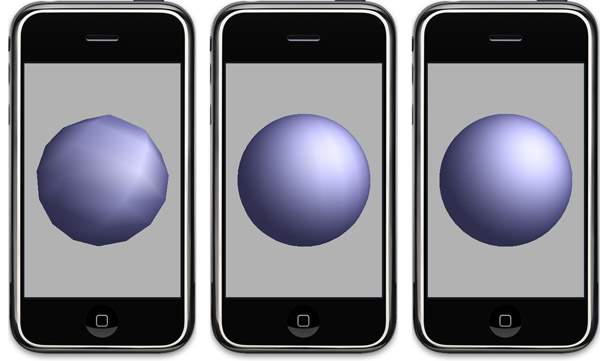
Three spheres created with this code, one with 8 slices and stacks (left), one with 25 slices and stacks (middle) and one with 50 slices and stacks (right).
Right now, this code comes in the shape of a rather scary-looking (but well-commented and quite attractive looking) C-function that takes four handles, two pointers, two unsigned integers, and a float.
My plan is to wrap this all up in a nice Objective-C class at some point in the not-too-distance future so that it will be easier to use, but I probably won't get to that right away. So, since I figure there must be some other people out there who need spheres or are curious how they might be done, I'm posting a sample project with my rough sphere code that you can look at to see how it works.
Since these two sets of vertices have to be submitted to OpenGL separately, it made sense not to combine them into one array. In order to work with lights and smooth shading, the function also calculates the normals for both of these arrays - which accounts for the other two handles.
The two pointers are to variables that, on return, will identify the number of vertices in the triangle strip vertex array and the triangle fan vertex array.
Finally, there's a GLfloat that's used to specify the size of the sphere, and two GLuints to specify the number of stacks and slices. You'll probably almost always want to use the same number of stacks and slices, but I kept them separate just in case.
To use this function, you need to declare some variables. In the sample projects, they are instance variables of the view controller:
These values get passed in like so:
You do not have to allocate memory for the vertices or normals. BUT you do have to free the memory when you're done, like so:
Finally, here's how you draw the sphere using the values returned from getSolidSphere():
That's all there is to it. I'll be using this code in the next OpenGL blog posting so we can talk about lighting and materials, though I probably won't get to that until after the weekend. I'm going away for a long weekend and my wife's not letting me bring my computer.
Let me warn again that this code is probably not a good solution for anything that needs to run fast in realtime on the phone with strong specular lighting. I'll probably add the ability to populate a texture coordinate array to this function at some point, which will make it more suitable to realtime programs. As always, use at your own risk, there are no warranties, yada yada. You know the drill.
I'm currently working on Part 5 of the OpenGL ES from the Ground Up series, which is on materials. I wasn't happy with using the icosahedron that I'd been using for the first four installments of the series. The interplay between lights and materials on the icosahedron just doesn't show the specular component in a way that's obvious enough. The ideal shape for showing a specular hightlight is, of course, a sphere.
So, I set out to render a sphere in OpenGL ES, which turned out to be nowhere near as straightforward as I thought it might be. Right now, the code is a little rough around the edges, but it works, and allows you to specify a "resolution" in terms of the number of "slices" and "stacks" that make up the sphere. These basically just define how many vertices there are latitudinally and longitudinally. Think of an orange. If you slice it with a knife vertically, those are "slices". If we cut it horizontally, those are "stacks". Well, not exactly, unless your knife curves at just the right angle, but it's good enough analogy.
As you can see from this illustration, the more slices and stacks you have, the smoother your sphere looks. But, the more slices and stacks you have, the more processing power your sphere uses. The number of vertices increases exponentially as you increase the stack/slice count.
Right now, this code comes in the shape of a rather scary-looking (but well-commented and quite attractive looking) C-function that takes four handles, two pointers, two unsigned integers, and a float.
// =========================================================
voidMy plan is to wrap this all up in a nice Objective-C class at some point in the not-too-distance future so that it will be easier to use, but I probably won't get to that right away. So, since I figure there must be some other people out there who need spheres or are curious how they might be done, I'm posting a sample project with my rough sphere code that you can look at to see how it works.
Note: I've been advised by somebody much smarter on OpenGL than I am that per-vertex specular highlights "look like total ass" unless you have a super-dense mesh, which you can see in the left-most screenshot above. In general, this code is probably not well-suited for use in a game or application where real-time performance is crucial if you're using strong specular lighting. But it will work quite nicely for showing the effects of lighting and material settings in OpenGL ES, especially when run in the simulator where we have processing power to spareThe sphere is built out of a triangle strip and a triangle fan, so one handle you pass in gets populated by the method with the vertex data for the triangle strip, another with the vertex data for the triangle fan.
Since these two sets of vertices have to be submitted to OpenGL separately, it made sense not to combine them into one array. In order to work with lights and smooth shading, the function also calculates the normals for both of these arrays - which accounts for the other two handles.
The two pointers are to variables that, on return, will identify the number of vertices in the triangle strip vertex array and the triangle fan vertex array.
Finally, there's a GLfloat that's used to specify the size of the sphere, and two GLuints to specify the number of stacks and slices. You'll probably almost always want to use the same number of stacks and slices, but I kept them separate just in case.
To use this function, you need to declare some variables. In the sample projects, they are instance variables of the view controller:
    Vertex3D    *sphereTriangleStripVertices;
    Vector3D    *sphereTriangleStripNormals;
    GLuint      sphereTriangleStripVertexCount;

    Vertex3D    *sphereTriangleFanVertices;
    Vector3D    *sphereTriangleFanNormals;
    GLuint      sphereTriangleFanVertexCount;
These values get passed in like so:
You do not have to allocate memory for the vertices or normals. BUT you do have to free the memory when you're done, like so:
if(sphereTriangleStripVertices)
if (sphereTriangleStripNormals)
if (sphereTriangleFanVertices)
if (sphereTriangleFanNormals)
Finally, here's how you draw the sphere using the values returned from getSolidSphere():
That's all there is to it. I'll be using this code in the next OpenGL blog posting so we can talk about lighting and materials, though I probably won't get to that until after the weekend. I'm going away for a long weekend and my wife's not letting me bring my computer.
Let me warn again that this code is probably not a good solution for anything that needs to run fast in realtime on the phone with strong specular lighting. I'll probably add the ability to populate a texture coordinate array to this function at some point, which will make it more suitable to realtime programs. As always, use at your own risk, there are no warranties, yada yada. You know the drill.
Monday, 4 May 2009
One problem with blog postings is that they are self-edited. For my postings here, I have no external technical review and no copy editing done. Mostly, it's not too much of a problem, as smart people read this blog and quickly point out my errors, and people seem to be pretty forgiving of the occasional grammatical or spelling gaffe.
But, sometimes, the result of this being a one-man production is that I miss something that I really, really should have included. While re-reading part 4, I realized that I used both glLightfv() and glLightf() and it occurred to me that I never explained the naming format for OpenGL function calls. Back in part 1, I went through all the trouble of explaining the different OpenGL datatypes, but I didn't explain how they related to the alphabet soup at the end of the function call.
So, let me rectify this for those of you that haven't figured it out already.
OpenGL calls that don't take any parameters don't have alphabet soup at the end.There is only one version of those methods. Here's an example:
The same is basically true for methods that take only a specific type of parameter, such as GL_ENUM:
However, the vast majority of OpenGL function calls can be made using more than one dataype. This is much more pronounced in regular OpenGL, where most function calls have at least a half-dozen different variants, allowing you to pass GLshort, GLbyte, GLint, GLfloat, GLDouble, or GLfixed by value or by reference. In OpenGL ES, there's a much smaller subset of function calls and datatypes, so it's not quite as daunting or confusing, however OpenGL ES still follows the same naming convention, so it's a good idea to understand what that alphabet soup means.
The first and sometimes the second letter after the name of the function specify the datatype that this method takes. Here is a chart that explains what each suffix refers to:
As you saw back in Part 4, sometimes functions serve a more generic purpose, such as glLightf(). You call this method to set many different attributes of a given light. You use this call to set, for example, the spot cutoff as well as the light's position in 3D space. Spot cutoff requires a single value, but the light's position requires three.
For these functions, there is an additional variant marked by a v at the end of the method name, after the datatype letters. If you need to pass a regular datatype to OpenGL, you don't use this suffix and just pass in the datatype you need by value. But, if you need to provide more than a single OpenGL native datatype (in other words, that list from Part 1), then you have to put the values into an array and pass a pointer to the beginning of that array. When you pass values into OpenGL by reference like this, then you use the function call with the v suffix.
So, back in Part 4, when we told OpenGL the spot cuttoff value ,we used the regular non-v version, like this:
but, when we passed in the light's position, which takes three GLfloats, we used the v variant and passed in an array, which is exactly the same thing as passing a pointer to the first value of the array:
I hope this helps anyone who was confused by the function names. At some point, I'll try and integrate this information into part 1, but I since it was kind of an obvious oversight on my part, I wanted to post it.
But, sometimes, the result of this being a one-man production is that I miss something that I really, really should have included. While re-reading part 4, I realized that I used both glLightfv() and glLightf() and it occurred to me that I never explained the naming format for OpenGL function calls. Back in part 1, I went through all the trouble of explaining the different OpenGL datatypes, but I didn't explain how they related to the alphabet soup at the end of the function call.
So, let me rectify this for those of you that haven't figured it out already.
OpenGL calls that don't take any parameters don't have alphabet soup at the end.There is only one version of those methods. Here's an example:
GL_ENUM error = glGetError();The same is basically true for methods that take only a specific type of parameter, such as GL_ENUM:
However, the vast majority of OpenGL function calls can be made using more than one dataype. This is much more pronounced in regular OpenGL, where most function calls have at least a half-dozen different variants, allowing you to pass GLshort, GLbyte, GLint, GLfloat, GLDouble, or GLfixed by value or by reference. In OpenGL ES, there's a much smaller subset of function calls and datatypes, so it's not quite as daunting or confusing, however OpenGL ES still follows the same naming convention, so it's a good idea to understand what that alphabet soup means.
The first and sometimes the second letter after the name of the function specify the datatype that this method takes. Here is a chart that explains what each suffix refers to:
- b GLbyte
- s GLshort
- i GLint
- f GLfloat
- ub GLubyte
- us GLushort
- ui GLuint
Note: In regular OpenGL, there might also be a number as part of the suffix. This number would represent the number of that datatype that is needed. So, for example, the function glVertex3f() takes three GLfloats. Since this naming convention is mostly used in direct mode, which OpenGL ES doesn't have, you won't see this naming convention as often in OpenGL ES, however there are a few functions that follow this naming convention like glColor4f(). OpenGL ES doesn't support, for example, glColor3f(), but keeps the number as part of the prefix to maximize compatibility between the two APIs
As you saw back in Part 4, sometimes functions serve a more generic purpose, such as glLightf(). You call this method to set many different attributes of a given light. You use this call to set, for example, the spot cutoff as well as the light's position in 3D space. Spot cutoff requires a single value, but the light's position requires three.
For these functions, there is an additional variant marked by a v at the end of the method name, after the datatype letters. If you need to pass a regular datatype to OpenGL, you don't use this suffix and just pass in the datatype you need by value. But, if you need to provide more than a single OpenGL native datatype (in other words, that list from Part 1), then you have to put the values into an array and pass a pointer to the beginning of that array. When you pass values into OpenGL by reference like this, then you use the function call with the v suffix.
So, back in Part 4, when we told OpenGL the spot cuttoff value ,we used the regular non-v version, like this:
but, when we passed in the light's position, which takes three GLfloats, we used the v variant and passed in an array, which is exactly the same thing as passing a pointer to the first value of the array:
const GLfloat light0Position = ;
I hope this helps anyone who was confused by the function names. At some point, I'll try and integrate this information into part 1, but I since it was kind of an obvious oversight on my part, I wanted to post it.
Subscribe to:
Posts (Atom)


